
Digital Signatures...
A digital signature is a cryptographic technique used to validate the authenticity and integrity of a digital message, document, or piece of data. It is the digital equivalent of a handwritten signature or a stamped seal, but it provides far more security.

I’ve always been fascinated by how trust works in the digital world—how can we be sure that a document or message is really from the person who claims to have sent it? Recently, while diving into the world of Public Key Infrastructure (PKI), I came across the concept of digital signatures, and it all started to click.
Imagine signing a contract by hand. Now, think about doing that online, but with a level of security that far surpasses pen and paper. That’s what digital signatures bring to the table. They’re like the modern-day wax seal, ensuring that what’s sent is exactly what was intended, and from exactly who it claims to be.
In my latest blog post, I break down how this cryptographic magic works and why it’s so crucial in today’s digital age. Trust me, it's pretty cool stuff!
A digital signature is a cryptographic technique used to validate the authenticity and integrity of a digital message, document, or piece of data. It is the digital equivalent of a handwritten signature or a stamped seal, but it provides far more security. Digital signatures are widely used in various applications, including email communication, software distribution, financial transactions, and legal agreements, to ensure that the content has not been altered and to verify the identity of the sender.
How Digital Signatures Work?
Digital signatures rely on asymmetric cryptography, also known as public-key cryptography. This involves a pair of keys: a private key and a public key. Here's how the process typically works:
1. Key Pair Generation
- A pair of cryptographic keys is generated: a private key and a public key.
- The private key is kept secret by the owner and is used to create the digital signature.
- The public key is shared with anyone who needs to verify the authenticity of the digital signature.
2. Signing Process
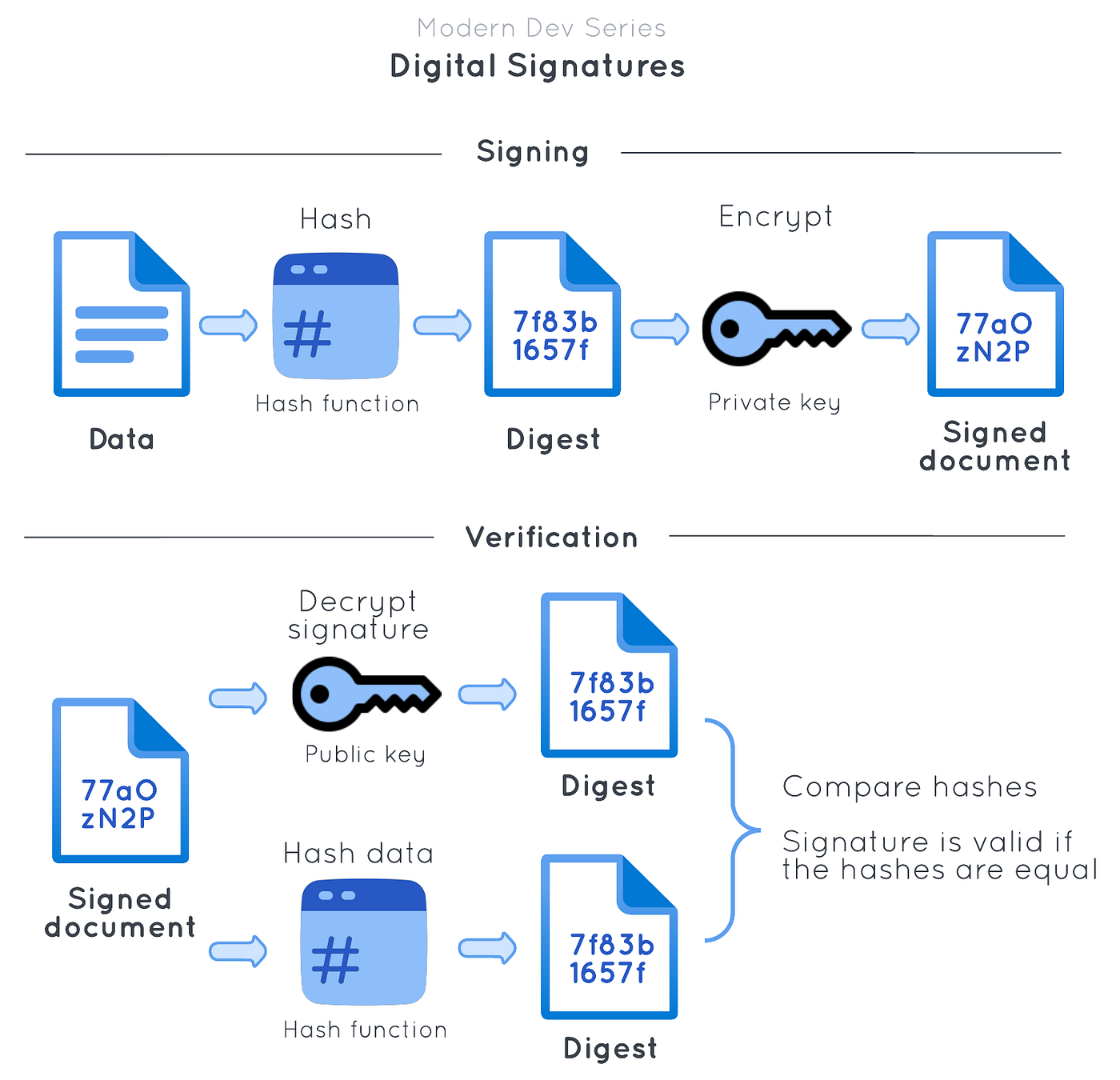
- Hashing: The sender creates a hash of the message or document using a cryptographic hash function (e.g., SHA-256). A hash function converts the message into a fixed-size string of characters, which is unique to the input data. Even a small change in the input data will result in a vastly different hash.
- Signing the Hash: The sender encrypts the hash with their private key. This encrypted hash, along with information about the hashing algorithm used, forms the digital signature.
3. Sending the Signed Message
- The digital signature is sent along with the original message or document to the recipient. The digital signature can be appended to the message or sent as a separate file.
4. Verification Process
- Hashing Again: The recipient uses the same cryptographic hash function to generate a hash of the received message or document.
- Decrypting the Signature: The recipient uses the sender's public key to decrypt the digital signature. This decryption yields the hash value that was originally created by the sender.
- Comparing Hashes: The recipient compares the hash generated from the received message with the decrypted hash from the digital signature. If the two hashes match, it confirms that the message has not been altered since it was signed and that the signature was created using the sender's private key.
Key Properties of Digital Signatures
- Authentication:
- The digital signature provides proof that the message or document was created and sent by the person who owns the private key. This authenticates the sender's identity.
- Integrity:
- The digital signature ensures that the message or document has not been altered in transit. If the content is modified after signing, the hash values will not match, indicating tampering.
- Non-repudiation:
- Once a message or document is signed with a digital signature, the sender cannot deny having signed it. This provides a mechanism to prevent the signer from repudiating the validity of their signature.
Credits and References:
https://www.docusign.com/how-it-works/electronic-signature/digital-signature/digital-signature-faq
https://en.wikipedia.org/wiki/Digital_signature
https://www.geeksforgeeks.org/digital-signatures-certificates/
ChatGPT for typos :)